Monday, April 25, 2016

GJ - Day 1 - Reveal

Planetbase


In the game "Planetbase" you will establish many different kinds of facility and connect facilities together.
For the colonists and to run the base, you will need to secure resources such as oxygen, food and water.  You will install solar panels and collect electric power, plant vegetables in Bio-Dome, and collect air from oxygen generator. Doing those, you will expand the base and eventually build a colony which many colonists live in.

In this game, the management of distributions and colonists will be the key.  There are AI robots called "Carried Bot" which will carry the  materials.  To make a distribution for them, you will need to think the best place to establish the facilities and to make the path.  Produce materials, AI robots, space suits and so on and manage to have them be passed to the colonists.  
There are 4 kinds of colonists ; workers which are good at mining and moving machines, engineers which are good at building and repairing buildings, biologists who works on planting foods and  medic who maintain the health of colony.  It will be important how to work them will.  However, it will impossible to operate the colonists individually, they move automatically according to the facilities which are build.
  In this game, you will need to survives disasters such as meteors, sandstorms or solar flares. Moreover, there are three kinds of planets, desert planets, frozen planets, gas glant moon. The goal for this game is to go over the challenges on each planets and establish a colony in a new planet.


Here is the trailer > https://youtu.be/NvJr0SN83Zk

This video goes through the process and teaches the basic way to start it.  How to place, how to form the base, what you need and so on.Following his way might will help us to start this game.

Here are other videos>
 https://youtu.be/dMsXyBA4vz0?list=PLw7LcwDs7sjwsgvIZY7lic6-SA2DwhByk
https://youtu.be/fZuzw49h6iQ


Wednesday, April 13, 2016

Flash Animation 1 button

https://www.dropbox.com/s/xo9m8lppt9qvi6t/face%20first%20button.swf?dl=0

Friday, April 8, 2016

Friday Post April 8


select single player


select creative
 and go to "more world option"


select world type: superflat


To make the block float...
place two blocks
then...
left click and destroy the block below


press F2 to take a screen shot

go to option


go to resourse packs...


open resource pack folder
 then click on to the folder minecraft
next click on to screenshots
and there are the screenshots


how to upload to google photo and create an album

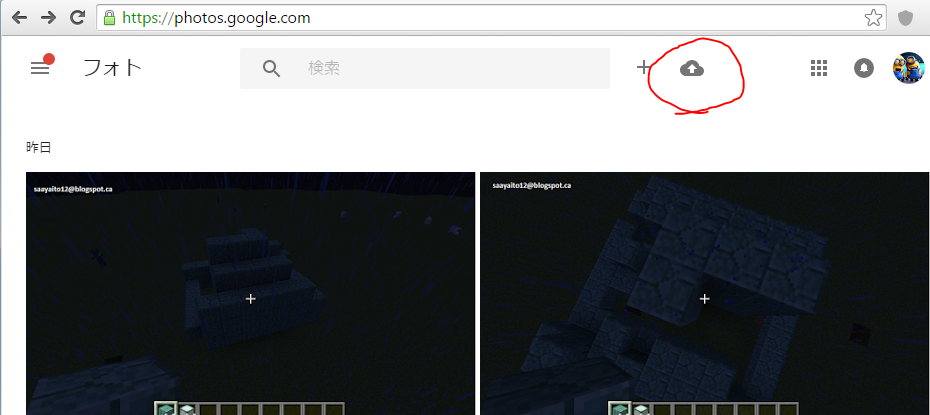
go to  https://photos.google.com/


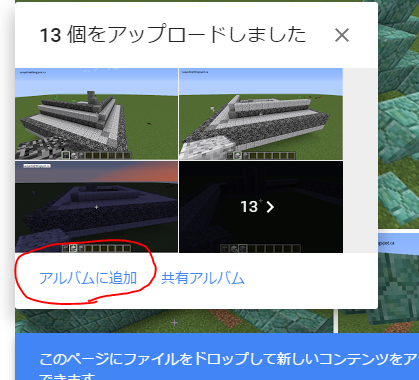
click on to the cloud and upload the pictures


then make a new album


then go to  https://picasaweb.google.com/home

first click the album and share


then click " link to this album"


then click "embed slideshow"


this pops out 
choose "extra large 600 px"
 and check into "show captions"

finally copy the code and paste into HTML of my blog